Consent Collected by IDScan.net
The consent form is hosted by Screening Service — you do not need to build or host it yourself.
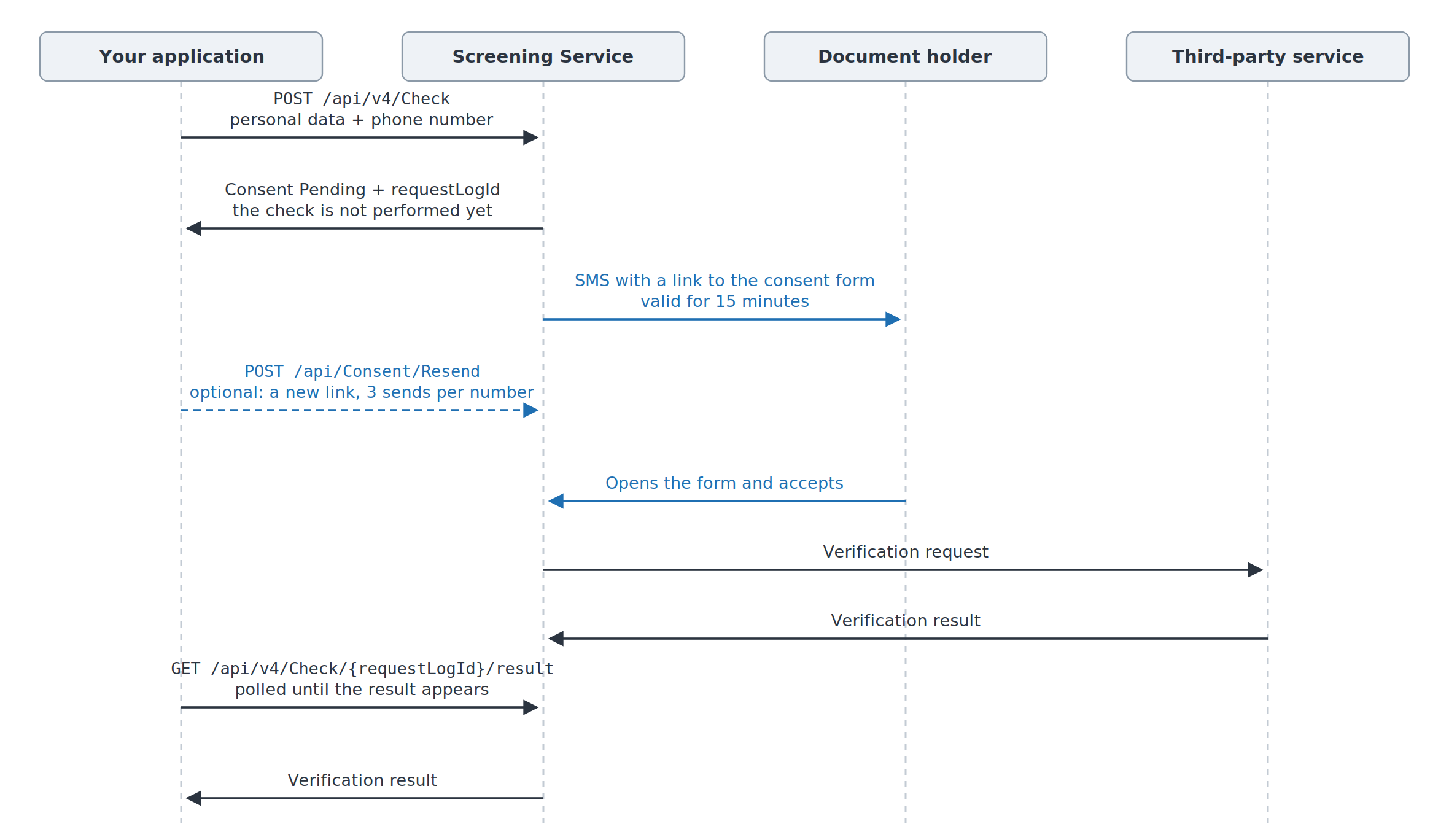
You send a check and include the document holder's phone number in the request. If consent is required for the requested service and jurisdiction — see Checking Consent Requirements — Screening Service creates the form, sends an SMS with a link to it to that number, and waits for confirmation. Until then the check is not performed; once consent is given, the service performs the check and stores the result, and you retrieve it with a separate request.
Note
The consent scenario does not run on test tokens: the check is performed right away and no SMS is sent. Test the scenario with a live token.
Check Request
https://screening.idscan.net/api/v4/Check
POST
Although the endpoint URL includes the version, you must also include the api-version header for proper request routing:
api-version: 4.0
The phone number is passed in the "phone" object, as 10 digits with no separators or extensions. The remaining fields depend on the service — the example below uses the fields required for DMV Data Verification.
Here is a JSON request data example:
{
  "firstName": "SAMPLE",
  "lastName": "LICENSE",
  "issuedBy": "PA",
  "state": "PA",
  "driverLicenseNumber": "L12345678",
  "services": ["F1366C39-D0CD-458C-81F8-EFD7B0753A5B"],
  "phone": {
    "phoneNumber": "5551234567"
  }
}
Response Data
The check is not performed right away: the request is accepted with a consent-pending status. Here is the JSON response example for the request above:
[
  {
    "requestDetail": {
      "requestLogId": 17528344,
      "requestDateUtc": "2026-09-23T10:07:39.8618708Z",
      "requestStatus": "Consent Pending",
      "requestStatusCode": 3
    },
    "metadata": {},
    "success": false,
    "consentUrl": null,
    "error": {
      "message": null,
      "traceId": null
    },
    "service": {
      "id": "f1366c39-d0cd-458c-81f8-efd7b0753a5b",
      "name": "DMV Verification",
      "description": "Driver License Data Verification",
      "isMultipleProfiles": false
    },
    "location": {
      "locationId": null,
      "readOnlyAccessLocationIds": null
    },
    "serviceVerificationResult": null,
    "profiles": null
  }
]
You need "requestLogId" to retrieve the result and to resend the link.
Important
"success" tells you that the check completed successfully, not that the request was accepted. While consent has not been given, no check has been performed yet, so it is false here. The state of the request is given by "requestStatus".
Link Lifetime
The link is valid for 15 minutes. After that it stops working and the request moves to Fail with the message Client did not complete the consent form (session expired). — the check is not performed.
Resending the SMS
https://screening.idscan.net/api/Consent/Resend
POST
This endpoint is not versioned, so the api-version header is not needed.
Here is a JSON request data example:
{
  "requestLogId": 17528344,
  "phone": {
    "phoneNumber": "5551234567"
  }
}
Each send creates a new link. Only the most recent one works: the form no longer opens through the previous link — instead the document holder sees a page stating that the link is no longer valid and that a new one has to be requested.
Important
A link is sent to the same number no more than 3 times, including the first send as part of the check request. Beyond that, Maximum consent SMS attempts (3) reached for this phone number. is returned. If you pass a different number, the counter starts over.
Retrieving the Result
https://screening.idscan.net/api/v4/Check/{requestLogId}/result
GET
api-version: 4.0
Until consent is given, the response is the same as above — Consent Pending. Once consent is given, the check is performed and the result appears in the response: the structure is the same as for a regular check and is described on the page of the corresponding service. If no request with that "requestLogId" is found, or it belongs to another account, 404 is returned.
The result is retrieved by polling.
CURL requests
You can also test the flow via CURL. Here are the examples.
Check request:
curl -X POST https://screening.idscan.net/api/v4/Check -H "Content-Type: application/json" -H "Authorization: Bearer YOUR-TOKEN-HERE" -H "api-version: 4.0" -d "{\"firstName\":\"SAMPLE\",\"lastName\":\"LICENSE\",\"issuedBy\":\"PA\",\"state\":\"PA\",\"driverLicenseNumber\":\"L12345678\",\"services\":[\"F1366C39-D0CD-458C-81F8-EFD7B0753A5B\"],\"phone\":{\"phoneNumber\":\"5551234567\"}}"
Resending the SMS:
curl -X POST https://screening.idscan.net/api/Consent/Resend -H "Content-Type: application/json" -H "Authorization: Bearer YOUR-TOKEN-HERE" -d "{\"requestLogId\":17528344,\"phone\":{\"phoneNumber\":\"5551234567\"}}"
Retrieving the result:
curl -X GET https://screening.idscan.net/api/v4/Check/17528344/result -H "Content-Type: application/json" -H "Authorization: Bearer YOUR-TOKEN-HERE" -H "api-version: 4.0"
API v1
The scenario also works in the first version. The differences: the paths carry no v4 segment, the api-version header is not needed, and the response is flat, with no nested objects.
https://screening.idscan.net/api/Check — POST
https://screening.idscan.net/api/Check/{requestLogId}/result — GET
The check request body is the same. Here is the JSON response example with the consent-pending status:
[
  {
    "serviceId": "f1366c39-d0cd-458c-81f8-efd7b0753a5b",
    "serviceName": "DMV Verification",
    "serviceDescription": "Driver License Data Verification",
    "error": null,
    "success": false,
    "locationId": null,
    "readOnlyAccessLocationIds": null,
    "metadata": null,
    "requestStatus": "Consent Pending",
    "requestStatusCode": 3,
    "consentUrl": null,
    "requestLogId": 17528344,
    "profiles": null
  }
]
POST /api/Consent/Resend is the same for both versions.