Consent Collected on Your Side
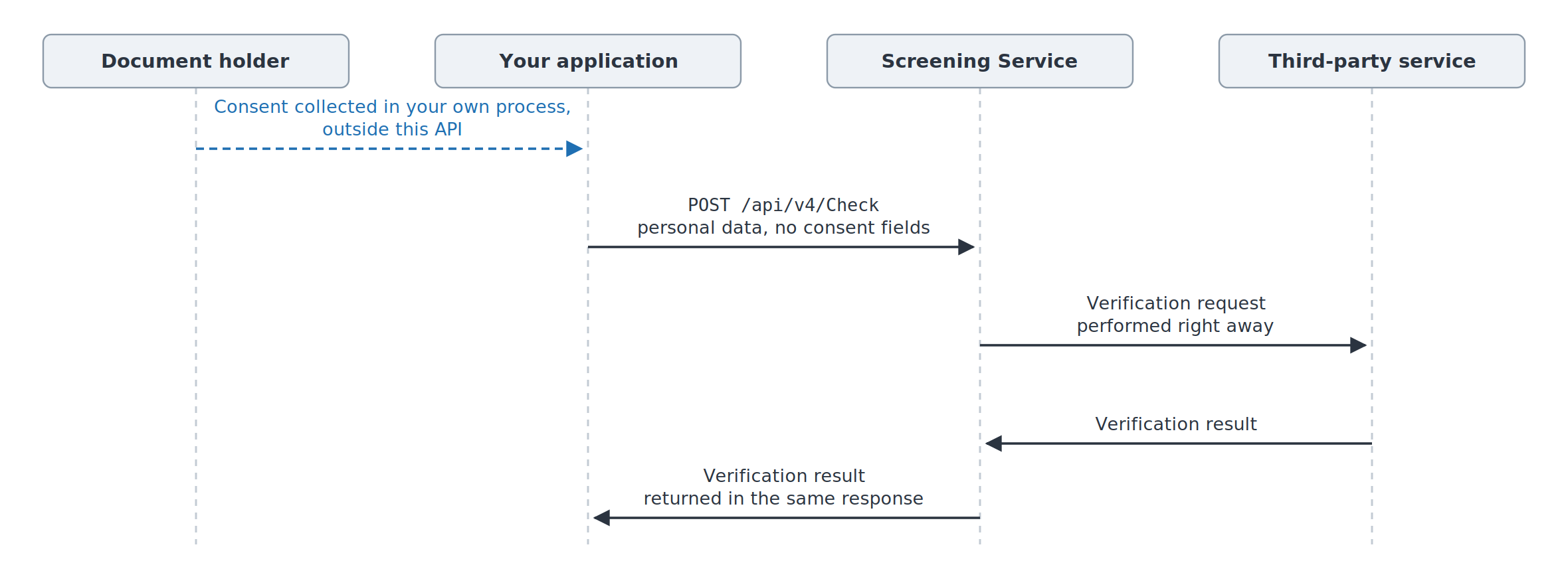
The consent form and the whole signing process are on your side: you compose the form, present it to the document holder, obtain the confirmation and store it yourself. All of this happens before you call the API.
Screening Service neither requests, presents nor stores the consent: the check is accepted and performed right away, and the result is returned in the same response.
Important
This scenario is determined by your account configuration, not by the contents of the request, and it applies to the whole account — every service and every jurisdiction. Consent cannot be left with us for some of the services only.
The list of services and jurisdictions that require consent is still useful: it tells you which checks you need to collect consent for yourself — see Checking Consent Requirements.
Check Request
https://screening.idscan.net/api/v4/Check
POST
Although the endpoint URL includes the version, you must also include the api-version header for proper request routing:
api-version: 4.0
No additional fields are needed: the request is the same as it would be without a consent requirement. The example below uses the fields required for DMV Data Verification.
Here is a JSON request data example:
{
  "firstName": "SAMPLE",
  "lastName": "LICENSE",
  "issuedBy": "PA",
  "state": "PA",
  "driverLicenseNumber": "L12345678",
  "services": ["F1366C39-D0CD-458C-81F8-EFD7B0753A5B"]
}
Response Data
The result is returned synchronously, and no consent-pending status occurs. The response has the same structure as a regular check and is described on the page of the corresponding service.
CURL request
You can also test the service via CURL. Here is an example:
curl -X POST https://screening.idscan.net/api/v4/Check -H "Content-Type: application/json" -H "Authorization: Bearer YOUR-TOKEN-HERE" -H "api-version: 4.0" -d "{\"firstName\":\"SAMPLE\",\"lastName\":\"LICENSE\",\"issuedBy\":\"PA\",\"state\":\"PA\",\"driverLicenseNumber\":\"L12345678\",\"services\":[\"F1366C39-D0CD-458C-81F8-EFD7B0753A5B\"]}"
API v1
The scenario also works in the first version: https://screening.idscan.net/api/Check, POST, no api-version header needed. The request body is the same and the response is the regular v1 one.