California DMV Digital Signature Verification API v4
This section describes how to integrate with the California DMV Digital Signature Verification v4 API. For developers already familiar with our platform, the v4 API adheres to the standardized request model used by v1 API, but unlike v1, v4 uses a different response model (see Response Data below).
Endpoint URL
https://screening.idscan.net/api/v4/Check
HTTP Method
POST
Content Type
application/json
Authorization
This API uses Bearer Token authentication. Include the following header in your request:
Authorization: Bearer {YOUR_TOKEN_HERE}
Important
Be sure there is a one space between Bearer and {YOUR_TOKEN_HERE}
If you are already familiar with our platform, you can obtain your API token by visiting the Screening Service Web portal. Detailed instructions on finding your token are available in our documentation.
If you are new to our platform, please contact our team at sales@idscan.net to get started, or reach out to support@idscan.net with any questions.
v4 API version Header
Although the endpoint URL includes the version, you must also include the api-version header for proper request routing:
api-version: 4.0
Request Data
{
  "services": ["19862c3a-513f-4d48-ab36-fa583e8df90a"],
  "trackString": "@\n\nANSI 636014100102DL00410294ZC03350220DLDAQD12345671\n..."
}
Request fields description
| Field Name | Required | Type | Possible Values |
|---|---|---|---|
| "services" | Yes | Array[string] | Must contain exactly: "19862c3a-513f-4d48-ab36-fa583e8df90a" |
| "trackString" | Yes | String | Raw PDF417 barcode string read from the back of the document |
Important
When the "services" field is null or is an empty array, all services enabled on your account will run. We do not recommend submitting requests this way. Be explicit about which services you want to run.
Response Data
[
  {
    "requestDetail": {
      "requestLogId": 2644,
      "requestDateUtc": "2026-06-10T09:33:57.4462461Z"
    },
    "metadata": {},
    "success": true,
    "error": {
      "message": null,
      "traceId": null
    },
    "service": {
      "id": "19862c3a-513f-4d48-ab36-fa583e8df90a",
      "name": "DMV Digital Signature Verification",
      "description": "Verifying Digital Signatures on US DL/ID Documents",
      "isMultipleProfiles": false
    },
    "location": {
      "locationId": null,
      "readOnlyAccessLocationIds": null
    },
    "serviceVerificationResult": {
      "statusCode": 1,
      "statusString": "Passed"
    },
    "profiles": [
      {
        "serviceResponseRaw": "{...}",
        "data": [
          {
            "fieldName": "IDNumber",
            "caption": "ID Number",
            "fieldType": "String",
            "value": "D12345671",
            "valueString": "D12345671",
            "matchStatusCode": 3,
            "matchStatusString": "Match",
            "message": "Document is Valid",
            "score": 0
          },
          {
            "fieldName": "RevocationStatus",
            "caption": "Revocation Status",
            "fieldType": "String",
            "value": "Not Revoked",
            "valueString": "Not Revoked",
            "matchStatusCode": 3,
            "matchStatusString": "Match",
            "message": "Document is Not Revoked",
            "score": 0
          }
        ]
      }
    ]
  }
]
Response fields description
A successful verification returns a response containing request detail, service information and a profile object.
#1. "RequestDetail" Object
requestLogId(int): Internal Screening Service request identifier.requestDateUtc(DateTime): UTC timestamp of the request.
#2. "Success" field (bool)
trueif the check completed successfully, otherwisefalseand theerrorobject will contain an error message (string) and traceId (string).
#3. "Service" Object
Contains common information about the service: name, identifier, description, etc.
#4. "Location" Object
Not required for this service, but you can review the detailed guide here.
#5. "ServiceVerificationResult" Object
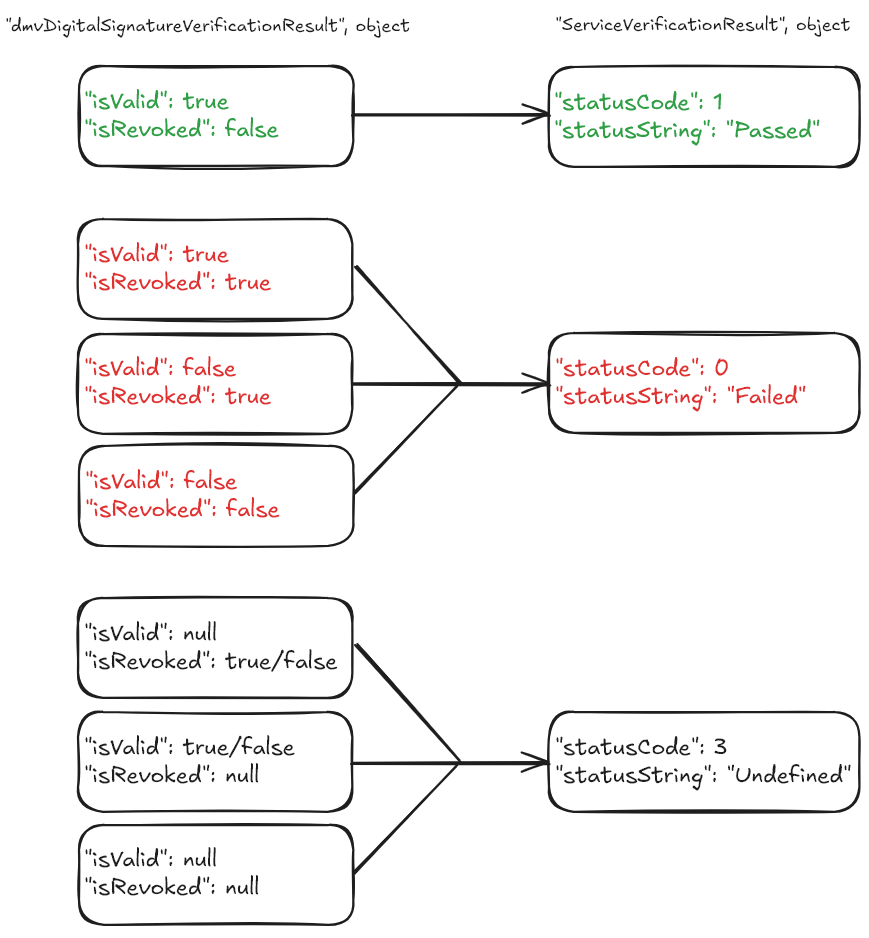
Unlike the v1 API response model which returns individual isValid / isRevoked flags, the v4 API returns an aggregated overall verification status. The serviceVerificationResult object contains this status. Possible values:
| StatusCode (int) | StatusString (string) |
|---|---|
| 0 | Failed |
| 1 | Passed |
| 3 | Undefined |
The following diagram illustrates how the v4 serviceVerificationResult is calculated based on the underlying verification results:
Important
Billable verification requests are those that return serviceVerificationResult status codes 0 or 1. Code 3 (Undefined) does not count against your subscription quota. If you receive Undefined status, please check your request for errors (see Error handling).
#6. "Profiles" Array
serviceResponseRaw(string): JSON string containing the raw internal service response. Note that this uses a different structure than the v1 API response:DMVDigitalSignatureVerificationResultcontains nestedValidationResultandRevocationResultsub-objects with PascalCase keys. To access the verification outcome, parse the JSON and readDMVDigitalSignatureVerificationResult.ValidationResult.IsValidandDMVDigitalSignatureVerificationResult.RevocationResult.IsRevoked.data(array of objects): Dynamic list of field match result objects. In addition toIDNumberandRevocationStatus, the array also includes personal data fields extracted from the barcode (FirstName, LastName, BirthDate, Address, etc.), each with amatchStatusCode.
The two key fields for this service (truncated example below — real responses contain more fields):
{
  "fieldName": "IDNumber",
  "caption": "ID Number",
  "fieldType": "String",
  "value": "D12345671",
  "valueString": "D12345671",
  "matchStatusCode": 3,
  "matchStatusString": "Match",
  "message": "Document is Valid",
  "score": 0
}
| Field | Type | Description |
|---|---|---|
fieldName |
string | Name of the field, e.g. "IDNumber", "RevocationStatus", "FirstName", etc. |
caption |
string | User-friendly field label, e.g. "ID Number", "Revocation Status", "First Name", etc. |
fieldType |
string | Field type. All fields for this service have value "String". |
value |
string | The value extracted from the barcode or returned by the verification service. |
valueString |
string | String representation of value. |
matchStatusCode |
int | Integer code for the field match result. See the table below. |
matchStatusString |
string | String representation of matchStatusCode. See the table below. |
message |
string | Additional message returned for the field (e.g. "Document is Valid", "Document is Revoked"). |
score |
int | Not used for this service. Value is always 0. |
| MatchStatusCode (int) | MatchStatusString (string) |
|---|---|
| 1 | No Match |
| 3 | Match |
The two key fields to check in data[]:
- IDNumber:
matchStatusCode= 3 (Match) means the cryptographic signature is valid (message: "Document is Valid").matchStatusCode= 1 (No Match) means invalid (message: "Document is Not Valid"). - RevocationStatus:
value= "Not Revoked" or "Revoked".matchStatusCode= 3 (Match) means not revoked;matchStatusCode= 1 (No Match) means revoked.
CURL request
curl -X POST https://screening.idscan.net/api/v4/Check \
  -H "Content-Type: application/json" \
  -H "Authorization: Bearer YOUR-TOKEN-HERE" \
  -H "api-version: 4.0" \
  -d "{\"services\":[\"19862c3a-513f-4d48-ab36-fa583e8df90a\"],\"trackString\":\"@\\n\\nANSI 636014100102DL...\"}"
Test cases
You can test and receive all verification statuses with your TEST token. Test cases are available here.
Error handling
Common errors are described here. Additional errors specific to this service are described here.